How to Choose a Robot Vacuum in 2026
Choose a robot vacuum by floor type, then navigation, then dock. See what actually matters in 2026 and what you can safely ignore when comparing models.
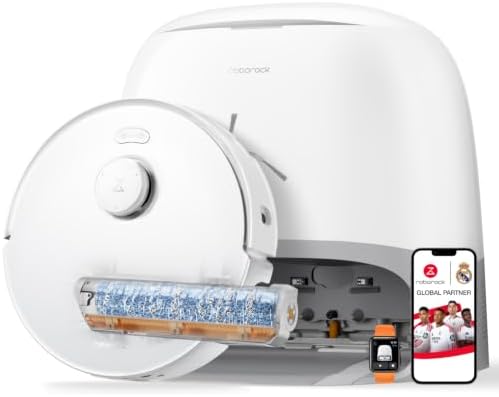
Buying a robot vacuum is mostly about ignoring the spec sheet. The numbers that fill the marketing pages, peak suction in Pascals, the number of sensors, the marketing name for the navigation system, are the ones that matter least once the robot is actually running in your home.
The short answer: choose by floor type first, then navigation, then the dock. Pick a rubber brush if you have pets, insist on real mapping if your home has more than one room, and buy the self-emptying dock you can afford. Then treat suction as a baseline rather than a goal.
Independent guide. We may earn a commission from links on this page.
The three decisions, in order
Almost every bad robot vacuum purchase comes from making these decisions in the wrong order. The sequence matters because each one narrows the shortlist more than the last.
- Floor type eliminates the most models. Carpet needs a motorised brush and airflow; hard floors need a mop that lifts. This single question removes half the market.
- Navigation decides whether the robot finishes a run. A robot with poor mapping cleans randomly, misses rooms, and gets stuck. This is the difference between an appliance and a toy.
- Dock type decides how much you touch it. A self-emptying dock is the feature you will notice every day; a bigger suction number you will never perceive.
Everything else, bin size, app polish, colour, is a tiebreaker between models that already passed those three tests.
1. Hair handling beats raw suction
If you have pets, the brush is the deciding feature. Look for rubber brush rolls, not bristle. Rubber resists hair wrap; bristles become a fur tumbleweed within a week, then lift off the carpet and stop cleaning entirely.
The suction figure (Pa) is the marketing number. What actually determines whether hair reaches the bin is whether it gets past the roller in the first place. A 5,000 Pa robot with a rubber brush and good sealing will out-clean a 10,000 Pa robot whose bristle roller is wrapped in dog hair.
Two practical checks:
- Is the brush user-removable? If not, skip it. You will need to clear hair regularly, and some models make that a screwdriver job.
- Does it have an anti-tangle design? Some brands use a split roller or a comb edge. In homes with long hair these genuinely reduce maintenance.
For models that pass this test, our pet-hair roundup ranks them by owner rating and price.
2. Self-emptying is worth the premium
A self-emptying dock lets the robot run for weeks without you touching it. On its own that sounds like a convenience feature. In practice it is the difference between a robot that is used daily and one that is used twice and then forgotten.
The reason is behavioural rather than mechanical. If emptying the bin is a task you have to remember, the robot becomes another chore, and chores get skipped. When the dock does it, the robot quietly becomes part of the house.
What to check:
- Bag capacity: how many weeks of dirt before you swap the bag.
- Bag cost and availability: a cheap dock with expensive proprietary bags is a false economy.
- Whether it also washes the mop if you are buying a combo, since that is the same convenience argument applied to mopping.
- Dock footprint: these things are large. Measure the space before you buy.
3. Mapping and navigation
Navigation is what separates a robot that cleans your home from one that wanders around it. It matters most in multi-room homes and least in a single open-plan studio.
| Technology | How it works | Best for |
|---|---|---|
| Random bounce | No map, changes direction on contact | One small room |
| Gyroscope | Tracks its own movement, builds a rough path | Studios and apartments |
| Camera / vSLAM | Uses visual landmarks to map | Well-lit homes |
| LiDAR | Laser range-finding, precise map | Most homes, especially multi-room |
| LiDAR + camera | Both, fused | Cluttered or complex layouts |
If your home has more than one room, LiDAR is the feature to insist on. It produces a map you can edit, lets you set no-go zones and room-by-room schedules, and dramatically reduces the number of times the robot gets stuck under furniture or tangled in a cable.
A camera-only system can work well and often costs less, but it needs reasonable light and struggles in very cluttered rooms. For a dim house or one full of obstacles, LiDAR is the safer choice.
Do you need mopping?
Only if you have hard floors and light, frequent messes. Mopping robots are good at dust film, paw prints and kitchen crumbs, and poor at dried or sticky spills. Our guide to whether a mopping robot is worth it covers the trade-off in detail.
The one habit that makes the decision easy: if you have rugs and hard floors, buy a model that lifts its mop. Without mop lift, a wet pad gets dragged across the carpet on every run.
What it actually costs to own one
The sticker price is not the full number. Budget for consumables:
- Dust bags: $15–$30 per pack, roughly 30–60 days per bag.
- Filters: $15–$25, replaced every 3–6 months.
- Brush rolls: $20–$35, more often with long hair or pets.
- Mop pads (combo models only): $15–$40, replaced every 2–6 months.
For a heavily used robot that is roughly $80–$180 a year. It rarely changes the buying decision, but it is worth knowing when comparing two models $100 apart.
How to decide, in order
Work down this list and stop where you land.
- Mostly carpet? Vacuum-only model with a rubber brush and suction matched to your pile.
- Mostly hard floor, with rugs? Combo with mop lift and a self-washing dock.
- Have pets? The rubber brush requirement comes first, whatever your floors are.
- Under $250? Buy the best vacuum-only model you can. Cheap combos do every job badly.
- Multi-room home? Insist on LiDAR navigation before anything else.
- Otherwise: buy the best self-emptying model in budget, and let the dock carry the daily convenience.
That sequence produces a shortlist of two or three models, at which point the differences between them are genuinely small.
Common buying mistakes
- Buying on suction alone. The brush tangles or the navigation fails long before suction becomes the limiting factor.
- Skipping the dock decision. It determines your daily effort more than any spec.
- Ignoring floor type. A carpet-optimised robot on hardwood, or the reverse, is money wasted.
- Not checking the app. A poor app ruins a technically excellent robot, because you stop using the features.
- Forgetting consumables. Proprietary bags and pads can double the two-year cost.
- Buying too much robot. A flagship designed for a large multi-storey home is wasted in a studio.
- Trusting the marketing navigation name. “Smart mapping” is not LiDAR. Check the spec.
What to expect after you buy
The first week is an adjustment period, not a failure.
- The first runs build the map. Expect some bumping and inefficient paths while it explores.
- Set no-go zones early for cables, pet bowls, and fringed rugs. This is a ten-minute task that prevents most recurring problems.
- Establish a maintenance rhythm from week one. Empty, rinse, and clear the brush on a schedule you will actually keep.
- Expect to tweak zones and schedules for a few weeks until it fits your routine.
After that it settles down. Most owners describe the robot as invisible by month two, which is the point.
Bottom line
Decide in this order: floor type, then navigation, then dock. If you have pets, the rubber brush requirement comes before everything. If you have more than one room, insist on LiDAR. If you have rugs and hard floors together, buy a model that lifts its mop.
Then buy the best self-emptying model you can afford and treat the suction number as a baseline rather than a target. To see how this framework applies to specific models, start with our vacuum and mop combos, budget picks, and self-emptying roundup.
FAQ
How much should I spend on a robot vacuum? $150–$250 for a small home with hard floors, $600–$1,000 for a typical home with pets, and $1,000+ for heavy shedding or multi-room mopping. Above that you are buying dock features rather than cleaning power.
Do I need LiDAR navigation? In a multi-room home, yes. It produces an editable map and dramatically reduces stuck episodes. In a single open-plan studio, a cheaper navigation system can be sufficient.
What is the most important spec? Brush type, not suction. A rubber brush roll that resists tangling matters more than any peak Pa figure.
Is a self-emptying dock worth it? For most households, yes. It is the feature that keeps the robot in daily use rather than becoming another chore you skip.
How long do robot vacuums last? Three to six years with maintenance. The battery is usually the first component to degrade.
Can I run a robot vacuum with pets at home? Yes, and most models are safe around them. Some pets are unsettled at first. Set no-go zones around feeding areas and let them get used to it.