Best Security Camera Systems (2026): Kits With Local Storage
The best security camera systems for 2026 — PoE kits, NVR bundles, and multi-camera options with local storage, compared on coverage and cost.
Pros
- Every pick records to local storage — no subscription required
- PoE options never need recharging or battery swaps
- Scales from one camera to a full 16-channel NVR
Cons
- PoE cameras need an Ethernet run to each location
- Full NVR kits cost more upfront than a single camera
| Product | Price | Rating | Highlights |
|---|---|---|---|
| $209.99 | 4.2 / 5 |
| |
| $199.99 | 4.3 / 5 |
| |
| $249.99 | 4.0 / 5 |
| |
| $1,259.99 | 4.4 / 5 |
|
A “security camera system” means different things at different scales: one great camera that covers a doorway, or a multi-camera NVR that records an entire property. The picks below cover both ends — and they all keep your recordings local.
Prices from the Amazon product feed, checked October 2026.
How we picked
We weighed coverage per camera (field of view), power (PoE vs. solar), storage (local NVR/microSD vs. cloud), resolution, and cost per zone covered.
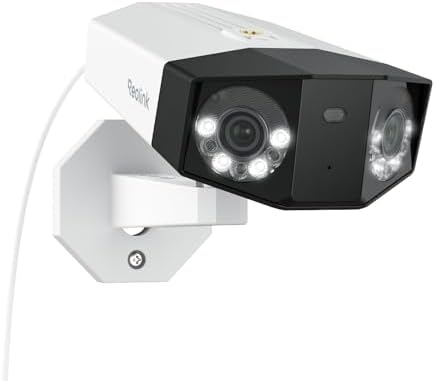
Best overall: REOLINK Duo 3 PoE
The REOLINK Duo 3 PoE uses a dual-lens design to see a full 180° in 4K, so one camera replaces two in many yards. PoE means it never needs charging.
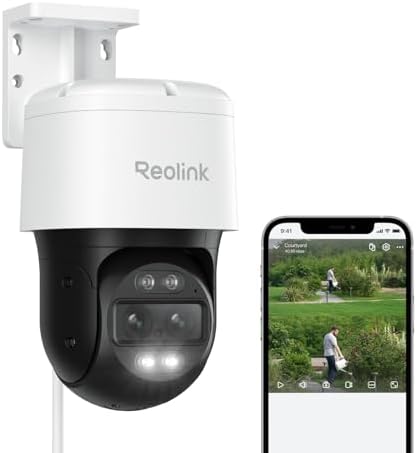
Best PTZ: REOLINK TrackMix PoE
If you want one camera to both watch wide and zoom in, the TrackMix PoE pans, tilts, and auto-tracks with 6x hybrid zoom.
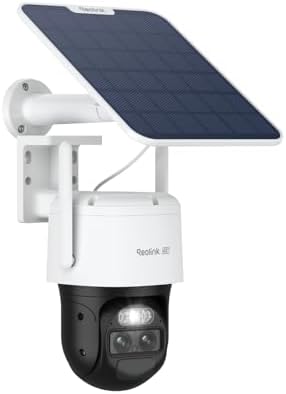
Best wire-free: REOLINK TrackMix 4K Solar
Where you can’t run cable, the TrackMix 4K Solar keeps itself charged with a panel while keeping PTZ and auto-tracking.
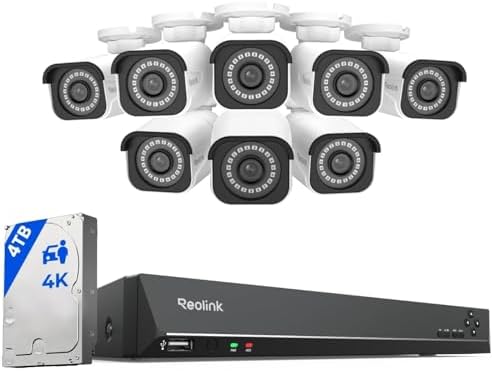
Best whole-property: REOLINK 16CH 4K NVR System
For full coverage, the REOLINK 16-channel 4K system bundles an NVR with a 4TB drive — recordings stay on your property with no monthly fee.
Bottom line
Start with one great camera (Duo 3 or TrackMix) and expand, or go straight to an NVR kit if you need whole-property coverage. For camera-first picks, see our best wireless outdoor security cameras roundup.
What actually matters in a camera system
Security camera marketing pushes resolution and megapixels. In practice, six factors decide whether a system is useful:
1. Power and connectivity. Battery/solar (easy, event-based) or PoE (wired, continuous). This is the first decision and it shapes everything else.
2. Local vs. cloud storage. Many systems record locally to an NVR or microSD with no monthly fee. A subscription should be a choice, not a requirement.
3. Night vision quality. Infrared sees in darkness; color night vision with a spotlight shows more detail but draws attention. Check the usable range, not just the claim.
4. Motion detection accuracy. Person/vehicle detection dramatically reduces false alerts versus generic motion. This is the difference between a useful system and alert fatigue.
5. Field of view and resolution. A 2K or 4K camera with a narrow view often beats a 1080p with a wide view — you cannot identify a face from a wide, low-res frame.
6. Reliability. Wired Systems rarely drop. Wireless depends on Wi-Fi signal, so signal at the mounting spot matters more than the camera’s spec sheet.
Wired vs. wireless: the real trade-off
| Wireless (battery/solar) | Wired (PoE) | |
|---|---|---|
| Install effort | Minutes per camera | Hours (cabling) |
| Recording | Event-based, or plug-in for continuous | Continuous 24/7 |
| Reliability | Wi-Fi dependent | Wired, stable |
| Maintenance | Battery/solar upkeep | None |
| Best for | Renters, quick coverage | Permanent installs |
The honest summary: wireless is easy but relies on Wi-Fi and usually records events, not everything. PoE is more work but records continuously and never drops.
How many cameras and where
| Coverage goal | Cameras | Positions |
|---|---|---|
| Entry only | 1–2 | Front door |
| Basic | 2–3 | Front, back, driveway |
| Typical | 4 | Entries, driveway, side |
Choke points beat coverage. Four cameras aimed at doors and the driveway outperform eight cameras scanning empty lawn. Start with the entry points and expand only for a specific concern.
Storage: how much do you need?
| Setup | Retention (typical) |
|---|---|
| 4 cameras, continuous 1080p, 2TB | 3–7 days |
| 4 cameras, motion-only, 2TB | 2–4 weeks |
| Cloud subscription | As long as you pay |
Motion-only recording stretches storage dramatically and is sufficient for most homes. Continuous footage matters mainly if you need to review arbitrary moments.
Do you need a subscription?
No — and this is worth emphasizing. Local recording to an NVR or microSD covers most homes with no monthly fee. A subscription buys:
- Cloud storage
- Some AI detection features
- Easier remote access on some platforms
If a system requires a subscription to record at all, that is a design choice by the manufacturer, not a technical necessity. Prefer systems where local recording works without a plan.
Installation: DIY or professional?
DIY works for:
- Any wireless/battery/solar camera.
- Wired cameras where you can route cable yourself.
Hire a pro for:
- Cable runs through finished walls or masonry.
- High or dangerous mounting points.
- Multi-camera NVR systems you want warrantied.
For most homes, the wire-free route is a genuine afternoon DIY. See our security camera installation cost guide for what professional installation runs.
Common mistakes
- Mounting too high, which records the tops of heads.
- Aiming at the street, which records neighbors and traffic.
- Skipping the Wi-Fi check, then wondering why recordings drop.
- Assuming a subscription is required when local storage works.
- Turning on alerts for every camera, then ignoring all of them.
- Not setting motion zones, resulting in constant false alerts.
FAQ
Is a security camera system worth it? For most homes, yes — as deterrence and evidence. It is not a substitute for physical security like good locks and lighting.
Do cameras work without internet? Local recording works without internet; remote viewing and alerts need it. A PoE system with an NVR records even if the internet is down.
How long do security cameras last? Typically 3–7 years outdoors, depending on heat, moisture, and power quality.
Can I mix camera brands? Sometimes, via ONVIF or a common platform, but it is fiddly. Matched brands are simpler and more reliable.
Do I need a permit? Rarely for wireless; sometimes for wired systems with electrical work. Check local rules.
Wired POE vs. wireless kits: how to choose
The two common system types solve different problems:
Wireless kits (cameras + a hub or app):
- Easiest to install — no cable.
- Record on events (or continuous if plugged in).
- Best for renters and simple setups.
PoE systems (cameras + NVR + Ethernet):
- One cable per camera carries power and data.
- Continuous 24/7 recording.
- Best for permanent installs and larger homes.
| Wireless kit | PoE system | |
|---|---|---|
| Install | Minutes | Hours (cabling) |
| Recording | Events | Continuous |
| Reliability | Wi-Fi dependent | Wired |
| Cost (4 cams) | $200–$800 | $400–$1,200 + labor |
| Best for | Renters, quick setup | Permanent, whole-home |
If you need continuous footage and can run cable, PoE wins on reliability. If you need coverage fast without wiring, wireless wins. See our system cost breakdown for the full price picture.
Privacy and data: where your footage lives
A camera system captures sensitive footage, so decide where it lives before you buy:
- microSD in each camera: cheap, private, one card per camera.
- Local NVR: one recorder, no subscription, larger storage.
- Cloud: convenient, recurring cost, footage leaves your home.
For privacy, local storage is the better default. It also avoids monthly fees. Cloud is convenient if you travel and want off-site backup, but check the privacy terms and whether the footage is encrypted.
Setting up alerts without alert fatigue
The most common reason people stop using a camera system is too many notifications. Fix it at setup:
- Use person/vehicle detection, not generic motion, where available.
- Draw motion zones excluding the street and sidewalk.
- Alert selectively — maybe only the front door and driveway, not all four cameras.
- Set a schedule if you only want alerts at night.
- Review after a week and tighten zones that are still noisy.
A system you ignore is not protecting anything.
FAQ
How many cameras do I need for a typical home? Four covers most homes: front, back, driveway, and a side. Start with the entry points.
Can I install a camera system myself? Wireless systems, yes. PoE systems require running cable and possibly an NVR configuration; professional installation is worth it if cable must go through finished walls.
Do camera systems work without Wi-Fi? A PoE system with an NVR records without Wi-Fi or internet. Wireless systems depend on Wi-Fi.
What happens if the internet goes down? Local recording continues on NVR and microSD systems. Remote viewing stops until the connection returns.
How much does a camera system cost per year? With local storage, near zero beyond electricity. With cloud subscriptions, roughly $60–$180+ per year depending on cameras and plans.
Product gallery
Images: manufacturer / retailer product shots. Source: product datafeed.