Security Camera System Cost (2026): DIY Kits vs. Professional Installs
A DIY security camera system costs $200–$800; a professionally installed 4-camera system runs $800–$2,000. See 2026 prices, storage costs and what to skip.
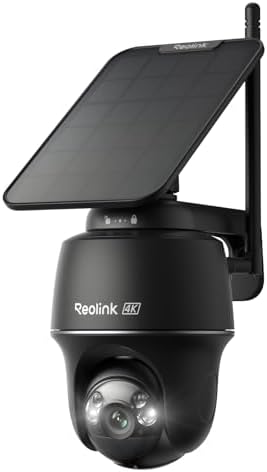
Typical cost ranges
| Item | Low | High | Notes |
|---|---|---|---|
| DIY wireless kit (2–4 cameras) | $200 | $800 | Battery/solar; install yourself. |
| DIY PoE system (4 cameras + NVR) | $400 | $1,200 | Wired; you run the cable. |
| Professional install (4 cameras) | $500 | $1,500 | Labor only; equipment extra. |
| Full system installed (4 cameras) | $1,000 | $4,000 | Equipment + labor + setup. |
| NVR with storage (2–4 TB) | $150 | $500 | Local recording, no subscription. |
| Cloud subscription (optional) | $0 | $180 | Per year; avoidable with local storage. |
| System with monitoring plan | $1,500 | $5,000 | Adds 24/7 professional monitoring. |
Ranges are typical U.S. market estimates for 2026 and vary by region, home, and contractor. Always confirm a written quote before work begins.
A DIY security camera system costs $200–$800 for two to four cameras. A fully installed system runs $1,000–$4,000+. The gap is almost entirely labor and cabling — the cameras themselves are often the smaller part of the bill.
Cost by path
| Path | Cost | Notes |
|---|---|---|
| DIY wireless (2–4 cams) | $200–$800 | Battery/solar; no wiring |
| DIY PoE (4 cams + NVR) | $400–$1,200 | You run the cable |
| Pro install, 4 cams (labor) | $500–$1,500 | Equipment extra |
| Full system installed | $1,000–$4,000+ | Equipment + labor |
| With monitoring plan | $1,500–$5,000 | Adds 24/7 monitoring |
Kit vs. custom system
Kits are cheaper and simpler. The components are matched, the app works out of the box, and setup is usually a single process. You trade flexibility for convenience.
Custom systems let you pick a camera for each spot — a wide-angle for the driveway, a PTZ for the yard, a doorbell for the entry. They cost more and take more configuration, but they fit the property better.
For most homes, a kit covering the entry points is the better value. Custom makes sense for larger properties or specific coverage needs.
Wireless vs. PoE: the cost trade-off
| Wireless (battery/solar) | PoE (wired) | |
|---|---|---|
| Equipment | $50–$200/cam | $60–$250/cam |
| Installation labor | $0 (DIY) | $100–$250/cam |
| Recording | Event-based, or plug-in for continuous | Continuous 24/7 |
| Reliability | Wi-Fi dependent | Wired, rock solid |
| Ongoing | Battery/solar upkeep | None |
Wireless wins on install cost and effort. PoE wins on reliability and continuous recording. The choice is usually about whether you need 24/7 footage and can run cable.
Where the money goes
For a professionally installed system, the breakdown is roughly:
- Equipment (cameras, NVR, storage): 40–50%
- Labor (mounting, cabling, configuration): 30–40%
- Cabling and materials: 10–20%
- Permits/monitoring (if applicable): varies
This is why the same camera list can cost $500 or $2,500 — the difference is the cable and the labor to run it.
Do you need monitoring?
Self-monitoring (app alerts) is free and sufficient for many homes. Professional monitoring ($15–$60/month) adds a call center that responds to alarms, which matters if no one is watching alerts.
If you are deciding:
- Home often, just want alerts and footage → self-monitoring, no monthly fee.
- Away frequently, want someone to act → professional monitoring.
- Just want recording for evidence → local NVR, no subscription.
The subscription decision is separate from the camera decision. Do not let a salesperson bundle them by default.
What drives the cost up
- Cable runs through finished walls or masonry.
- Camera count beyond the entry points.
- PoE vs. wireless — wired costs more to install.
- NVR and storage size.
- Mounting height and access difficulty.
- Monitoring plans over multiple years.
- Permits, where required.
Questions to ask before you buy
- Is the quote itemized — equipment, labor, cable, configuration?
- Is local recording included with no subscription?
- How many days of footage will the storage hold?
- What happens if a camera fails — warranty on parts and labor?
- Can I add cameras later, and at what cost?
- Is the app free, or does it require a plan?
- Is the install warrantied, and for how long?
Saving without cutting corners
- Start with entry points — front, back, driveway. Add perimeter later.
- Choose wireless or solar if you do not need continuous recording — it removes the entire labor line.
- Buy the equipment yourself if hiring an installer, so you are not paying a markup.
- Use local storage instead of cloud subscriptions where possible.
- Bundle cameras into one install to avoid repeat trip charges.
- DIY the easy cameras and hire for the hard ones.
Ongoing costs
| Item | Typical |
|---|---|
| Cloud subscription | $0–$180/year (avoidable) |
| Battery replacements | $10–$40/year (unless solar) |
| microSD cards | $15–$40 one-time |
| Maintenance | $0 (occasional cleaning) |
| Monitoring (optional) | $180–$720/year |
The subscription line is the one people forget. Ask before buying whether you can record locally with no monthly fee — for most homes, you can.
FAQ
How much does a 4-camera system cost installed? $1,000–$4,000+, depending on wired vs. wireless, equipment tier, and labor. Wireless is at the low end; PoE with cabling is at the high end.
Are expensive camera systems better? Not necessarily. A mid-range system from a reputable brand, properly placed, usually outperforms a cheap system with more cameras in worse positions. Placement matters more than price.
Can I use cameras from different brands together? Sometimes, via a common platform or an NVR with ONVIF support, but it is fiddly. Matched brands are simpler and more reliable.
How long do security cameras last? Typically 3–7 years of continuous outdoor use. Heat, moisture, and power quality are the main factors.
Bottom line
For most homes, the sensible path is a DIY wireless kit at $200–$800 covering the entry points, expanded later as needed. If you want continuous recording, a DIY PoE system at $400–$1,200 is the next step. Professional installation at $1,000–$4,000+ buys convenience and clean cabling — worth it when cable must go through finished walls, but unnecessary for a wire-free setup.
Building the system: what to buy in what order
A camera system is best built incrementally, not all at once. This keeps cost realistic and coverage practical.
Step 1 — Cover the entry points (2–4 cameras). Front door, back door, driveway. This is where most incidents happen and where cameras have the most value. A doorbell camera plus one or two outdoor cameras covers most homes’ needs.
Step 2 — Add the storage layer. Decide local (NVR or microSD) vs. cloud. Local is cheaper long-term and private; cloud is easier but recurring. Most homes are well served by a local NVR with a few days to a couple of weeks of retention.
Step 3 — Expand to the perimeter (only if needed). Side gates, garage, fence line. Add these only if you have a specific concern. More cameras are not automatically better — placement beats count.
Step 4 — Consider monitoring (optional). Only if no one watches alerts. Self-monitoring is free and sufficient for many homes.
Building in that order means you spend money where it matters and can stop whenever coverage is adequate.
How many days of recording do you need?
Storage sizing confuses people, so here is the practical version:
| Recording mode | Typical retention with 2TB |
|---|---|
| 4 cameras, continuous 1080p | 3–7 days |
| 4 cameras, continuous 4K | 1–3 days |
| 4 cameras, motion-only | 2–4 weeks+ |
Key insight: motion-only recording stretches storage dramatically and is sufficient for most homes. Continuous recording is only necessary if you need to review arbitrary moments — rarely the goal outside commercial settings.
If you want continuous footage and long retention, budget for a larger NVR. Otherwise, motion-only with a modest drive is the cost-effective answer.
Wired vs. wireless in the real world
The choice is not just cost — it changes day-to-day reliability:
| Wireless | PoE wired | |
|---|---|---|
| Setup | Minutes per camera | Hours (cabling) |
| Reliability | Wi-Fi dependent | Wired, stable |
| Recording | Event-based or plug-in | Continuous 24/7 |
| Maintenance | Battery/solar upkeep | None |
| Best for | Renters, quick coverage, spot checks | Permanent installs, continuous recording |
The honest trade: wireless cameras are easy but rely on Wi-Fi and (for battery models) recording on events. If a camera loses Wi-Fi, it silently stops. PoE is more work to install but behaves like useful infrastructure — it is always on.
For a rental or a quick setup, wireless is clearly right. For a permanent home system where reliability matters, PoE is usually worth the install labor.
Privacy and security of your own footage
A camera system holds sensitive footage, so its own security matters:
- Change default passwords on cameras and the NVR, always.
- Enable two-factor authentication on the camera app account.
- Keep firmware updated — camera vulnerabilities are regularly patched.
- Isolate cameras on a separate network or VLAN if your router supports it.
- Prefer local storage where you want footage to stay private.
- Review who has app access and revoke old shares.
A camera system that gets compromised is worse than no system — it can expose your home to the very eyes you were trying to keep out.
Warranty and support
Before buying, check:
- Camera warranty length — typically 1–3 years.
- NVR warranty — often separate.
- App support and lifespan — a cheap camera whose app is abandoned becomes useless.
- Firmware support history — a sign of a brand that maintains its products.
The last two matter more than people expect. A camera is only as good as the app and the company behind it; brands that abandon apps strand their users with dead hardware.
The cheapest way to get real coverage
If budget is the constraint, the highest-value path is:
- One doorbell camera at the front entry.
- One or two outdoor cameras covering the back and driveway.
- A microSD card for local recording, no subscription.
- Motion zones configured to eliminate false alerts.
That setup costs well under $500, covers the entry points, and avoids every recurring fee. It is not the most capable system, but it delivers most of the practical value of a far more expensive one.
Frequently asked questions
How much does a security camera system cost?
A DIY wireless system costs $200–$800 for two to four cameras, and a DIY PoE system with an NVR is $400–$1,200. Fully installed systems run $1,000–$4,000+, with professional labor adding $500–$1,500 for four cameras.
Is it cheaper to buy a kit or build a system?
Kits are usually cheaper and easier to set up, since the components are matched and often include the app. Building your own lets you mix brands and choose cameras for specific spots, but can cost more and take more configuration.
Do I need a subscription for a security camera system?
No. Many systems record locally to an NVR or microSD card with no monthly fee. A subscription only buys cloud storage and some AI features. For most homes, local recording is sufficient.
How much does it cost to install 4 cameras?
Professional installation of four cameras typically costs $500–$1,500 in labor, plus the equipment. Wireless cameras are at the low end because there is no cabling; PoE systems cost more.
What is the cheapest way to get home camera coverage?
A DIY wireless kit with battery or solar cameras. Mounting and pairing are simple, and there is no wiring or labor cost. For continuous recording, a DIY PoE system is the next step up.
Is a security camera system worth it?
It depends on your risk and what you want to protect. Cameras deter some crime and give evidence, but they are not a substitute for physical security. Start with the entry points and expand as needed.