Best Wireless Outdoor Security Cameras (2026): 4K, Solar & Battery Picks
We compared the best wireless outdoor security cameras for 2026 — 4K solar, battery, and PoE options with no subscription required to start.
Pros
- Covers solar, battery, and PoE — no single point of failure for placement
- Every pick records locally (microSD/NVR), so you are not locked into a subscription
- Options from $36 to $200 for budgets of any size
Cons
- Mounting position and Wi-Fi signal matter more than specs for real coverage
- Battery models need recharging unless paired with a solar panel
| Product | Price | Rating | Highlights |
|---|---|---|---|
| $166.99 | 3.9 / 5 |
| |
| $199.99 | 4.3 / 5 |
| |
| $109.98 | 4.3 / 5 |
| |
| $35.99 | 4.3 / 5 |
|
A wireless outdoor camera is only as good as where you put it and how it stores footage. The picks below balance 4K/2K image quality, local storage, and honest coverage — without forcing you into a monthly plan just to see your own recordings.
Prices come from the Amazon product feed and were last checked in October 2026. Prices change; confirm the current price on the listing.
How we picked
We compared resolution, power source (solar / battery / PoE), field of view, local vs. cloud storage, and app quality. For most homes the deciding factor is power: solar and PoE cameras are set-and-forget, while battery cameras need periodic recharging unless you add a panel.
Best overall: REOLINK Argus PT Ultra
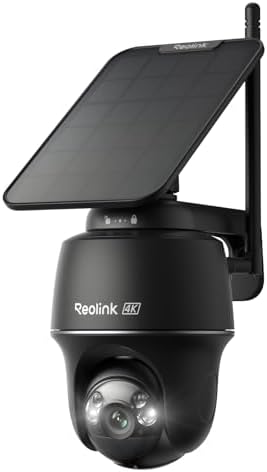
The REOLINK Argus PT Ultra is a 4K pan-tilt camera with a solar panel, so it stays charged with no wiring. It records to a local microSD card and pans a full 360°, which makes one camera cover a surprising amount of yard.
Best wired (PoE): REOLINK TrackMix PoE
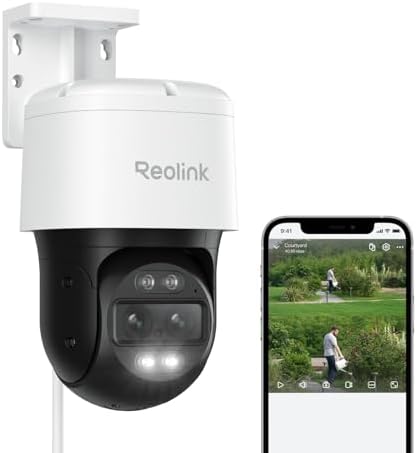
If you can run a single Ethernet cable, the REOLINK TrackMix PoE never needs charging. Its dual-lens design adds 6x hybrid zoom and auto-tracking, so it can zoom in on a person or vehicle while still watching the wide scene.
Best value system: aosu 2K QHD (2-cam kit)
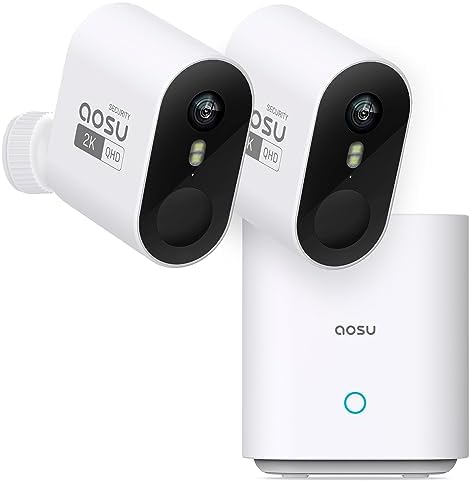
For a full starter system, the aosu 2K QHD 2-camera kit covers two zones out of the box at a low per-camera price, with battery power for easy mounting.
Best budget: ZUMIMALL 2K
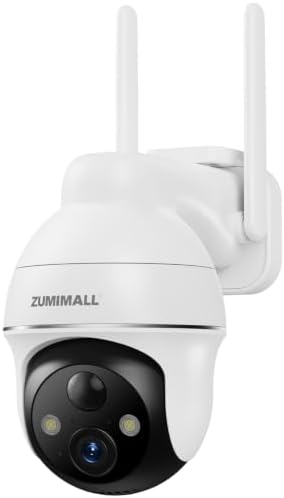
The ZUMIMALL 2K is the cheapest way to get a capable 2K outdoor camera on the wall, and it is a common first camera for renters and small yards.
Bottom line
Match the power source to the wall you have: solar if you want zero maintenance, PoE if you can run one cable, battery if you rent or move it around. Whichever you choose, pick a camera with local storage so recordings are yours without a subscription. Before you buy, think about where each camera will actually see — coverage matters more than resolution, and a well-placed 2K camera beats a badly-aimed 4K one.
Wireless outdoor cameras: what “wireless” really means
“Wireless” is used loosely. Three different things get called wireless:
1. Battery-powered. Runs on a rechargeable battery, no wiring at all. Records on events to save power.
2. Solar-powered. A small panel keeps the battery topped up. Effectively no maintenance if it gets sun.
3. Plug-in Wi-Fi. Needs an outlet but no network cable. Can record continuously.
All three avoid Ethernet cable. Only the battery and solar types avoid power wiring entirely — which is the feature people actually want.
What matters for an outdoor camera
1. Power source. Battery/solar for zero wiring; plug-in for continuous recording.
2. Weather rating. Look for IP65 or better for exposed locations, and check the operating temperature range for your climate.
3. Night vision. Infrared for monochrome, or color night vision with a spotlight. Check the usable range.
4. Detection. Person/vehicle detection reduces false alerts dramatically versus generic motion.
5. Local storage. microSD or NVR recording avoids monthly fees. Prefer cameras that record locally without a subscription.
6. Wi-Fi range. Signal must reach the mounting spot. Check with your phone before buying.
Battery vs. solar vs. plug-in
| Type | Wiring | Recording | Maintenance |
|---|---|---|---|
| Battery | None | Events only | Recharge every 1–6 months |
| Solar | None | Events only | Minimal (needs sun) |
| Plug-in | Outlet | Continuous possible | None |
Solar is the sweet spot for many homes: no wiring, no recharging, provided the panel gets a few hours of sun. Where there is no sun, battery or plug-in is the fallback.
Placement for outdoor cameras
- 8–10 feet high, angled slightly down to capture faces.
- Cover entry points — doors, driveway, gates — not the whole yard.
- Avoid pointing at the street, which floods you with traffic alerts.
- Check Wi-Fi at each spot before mounting.
- Shelter from direct weather where possible, even on weather-rated units.
See our full security camera placement guide.
Do you need a subscription?
No. Most modern cameras support local recording to microSD or an NVR, with no monthly fee. Subscriptions buy cloud storage and some AI features. If a camera requires a subscription to record at all, prefer a different model.
Installation
Wireless cameras are the easiest DIY install in home security:
- Charge the battery or mount the solar panel.
- Mount the bracket at the chosen spot.
- Snap the camera on and aim it.
- Pair it in the app and set motion zones.
Total time: 15–30 minutes per camera. No wiring, no electrician, no permit in most cases.
For what professional installation costs if you would rather not, see our installation cost guide.
Common mistakes
- Buying battery cameras for continuous recording — they record events to save power.
- Mounting where the sun never reaches a solar panel.
- Skipping the Wi-Fi check, leading to dropped recordings.
- Aiming at the street, causing constant false alerts.
- Assuming a subscription is required when local recording works.
- Ignoring weather ratings in exposed locations.
FAQ
Do wireless cameras need Wi-Fi? Yes, they use Wi-Fi for alerts and remote viewing. A wired PoE camera can record without Wi-Fi.
How long do battery cameras last per charge? Roughly 1–6 months depending on traffic, settings, and temperature. Solar charging extends this indefinitely where there is sun.
Can wireless cameras record 24/7? Battery models generally cannot without draining quickly; they record on events. Plug-in models can record continuously.
Do outdoor cameras work in rain and cold? Outdoor-rated units do, within their temperature range. Check the IP rating and the operating range before buying.
Are wireless cameras secure? They can be, if you change default passwords, enable two-factor authentication, and keep firmware updated. Local storage improves privacy.
Matching camera to location
Different outdoor spots need different cameras:
| Location | Recommended type |
|---|---|
| Front door | Doorbell camera or narrow-view camera |
| Driveway | Wide-angle or dual-lens |
| Back gate | Solar or battery, PTZ if coverage is wide |
| Side yard | Battery, low traffic |
| Garage | Plug-in, continuous recording |
Wide vs. narrow view: a ultra-wide camera sees a lot but identifies little. For entry points where you need to identify faces, a narrower field of view at higher resolution is more useful than a wide, low-detail frame.
PTZ cameras (pan-tilt-zoom) cover more area with one unit, but they cannot watch everywhere at once — they record where they are pointed.
How long do battery cameras really last?
Manufacturer claims of “6 months per charge” assume low traffic and conservative settings. Real-world expectations:
| Usage | Typical battery life |
|---|---|
| Quiet area, event recording | 3–6 months |
| Busy area, many events | 1–2 months |
| Cold weather | Reduced — often 30–50% less |
Cold is the enemy. Lithium batteries lose capacity in freezing temperatures, so a camera that lasts months in summer may need charging in weeks in winter. Solar panels help only if they get sun — snow and short days reduce output.
If you do not want to think about batteries, choose plug-in or PoE where an outlet or cable is available.
Privacy and neighbor considerations
Outdoor cameras raise practical and courtesy issues:
- Angle them at your own property where local rules allow.
- Avoid pointing into a neighbor’s window or private space.
- Disclose recording if your area requires it.
- Secure the account — outdoor cameras are a common target for takeover.
A camera that protects your property but creates a neighbor dispute is not a win. Aim, disclosure, and a strong password solve nearly all of it.
Product gallery
Images: manufacturer / retailer product shots. Source: product datafeed.